Widiscover
Github link
See the whole project here:
https://github.com/christos-golsouzidis/widiscoverTech stack
front end :
back end :
databases :
external APIs :
Description
Widiscover is a knowledge retrieval and question-answering system that leverages Wikipedia content and Groq’s AI models to provide accurate, source-backed answers to user queries. The system combines web scraping, vector search, and large language models to create an intelligent information retrieval platform.
Features
- AI-Powered Q&A: Generate answers from Wikipedia content using Groq’s LLMs
- Dual-Vector Search: Combines dense and sparse embeddings for precise document retrieval
- Configuration Management: Persistent settings storage with validation with adjustable parameters for chunking, search, and retrieval
- Web Interface: Serves a Svelte-based responsive frontend with automatic browser launch
- Error Handling: Comprehensive error handling for API calls and file operations
- Environment Management: Secure API key storage in
.envfiles
Architecture
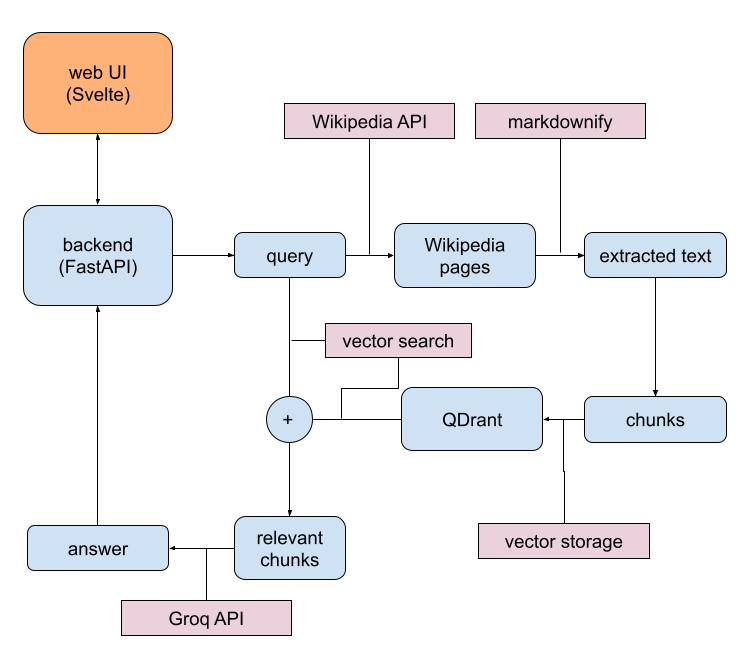
API Endpoints
GET /api/init- Initialize application and check required filesGET /api/main- Validate configuration and load environmentGET /api/config- Retrieve current configurationPOST /api/config- Update configuration and API keyGET /api/default- Get default configuration valuesPOST /api/query- Submit queries and receive AI-generated answers
Installation
Prerequisites
- Python 3.10+
- Groq API key (get one at https://console.groq.com/keys)
Setup
- Clone the repository:
git clone https://github.com/christos-golsouzidis/widiscover/ cd ./widiscover - Install dependencies on a python virtual environment:
or by using uv:pip install fastapi uvicorn aiofiles dotenv groquv add fastapi uvicorn aiofiles dotenv groq - Ensure that the
widiscover_corepackage is available in your Python environment. - Build the frontend:
# Navigate to ui/ directory and build the Svelte app
cd ui
npm run build
cd ..
File Structure
After the installation the project should have the following structure:
widiscover/
└── main.py              # Main application file
└── config.json          # Configuration file (auto-generated)
└── .env                 # Environment variables (auto-generated)
└── ui/
│   └── build/           # Frontend build files
│       └── _app/
│       └── index.html
│       └── main.html
│       └── config.html
|
└── README.md
Configuration
Environment Variables
You can optionally create an .env file in the root directory:
GROQ_API_KEY=<your_groq_api_key_here>Alternatively you can skip this step as by running the application you will be redirected to the settings (/config) and by providing the API key the .env file will be created automatically.
Usage
Starting the Server
Run the application directly:
python main.py # or 'python3 main.py'The server will:
- Start on
http://127.0.0.1:7454 - Open your default web browser automatically
- Check for required configuration files
- Redirect to setup if configuration is missing, otherwise to the main page.
These endpoints are for serving the front end:
@app.get("/")
async def render_index():
    return FileResponse('ui/build/index.html')

@app.get("/main")
async def render_main():
    return FileResponse('ui/build/main.html')

@app.get("/config")
async def render_config():
    return FileResponse('ui/build/config.html')
The data are validated through Pydantic, which is the default validation method with FastAPI:
class ConfigModel(BaseModel):
    configResultNumberPerPage: int = Field(ge=1, le=10)
    configChunkLength: int = Field(ge=100, le=10000)
    configChunkOverlap: int = Field(ge=0, le=2000)
    configTopKResults: int = Field(ge=1, le=16)
    configThreshold: float = Field(ge=0.0, le=0.75)
    configDistance: int = Field(ge=0, le=2)
    configGenerativeModel: Literal[
        "compound-beta",
        "compound-beta-mini",
        "gemma2-9b-it",
        "llama-3.1-8b-instant",
        "llama-3.3-70b-versatile",
        "meta-llama/llama-4-maverick-17b-128e-instruct",
        "meta-llama/llama-4-scout-17b-16e-instruct",
        "meta-llama/llama-guard-4-12b",
        "moonshotai/kimi-k2-instruct",
        "openai/gpt-oss-120b",
        "openai/gpt-oss-20b",
        "qwen/qwen3-32b",
    ]
When the / is loaded, the front end makes a GET call to /api/init:
  onMount(async () => {
    let result = await fetch('/api/init')
    if (result.ok || result.redirected) {
      let data = await result.json();
      goto(data.redirects);
    }
    else {
      throw Error('Error')
    }
  });
The back end receives the GET request and returns a json string (unless an exception occurs):
@app.get("/api/init")
async def get_init():
    '''
    GET /api/init:
    Checks for required configuration files and redirects accordingly.

    Behavior:
    1. If 'config.json' doesn't exist, creates it with default values.
    2. If 'config.json' exists but is invalid/empty, overwrites it with default values.
    3. If '.env' doesn't exist, creates it with empty GROQ_API_KEY.
    4. If '.env' exists but GROQ_API_KEY is empty or missing, notes the issue.

    Redirect logic:
    - Redirects to "/main" ONLY if both:
        a) 'config.json' exists AND is valid (parses successfully to ConfigModel)
        b) '.env' exists AND GROQ_API_KEY is not empty

    - Redirects to "/config" if ANY of these conditions are met:
        a) 'config.json' was created or overwritten
        b) '.env' was created
        c) GROQ_API_KEY is empty
        d) 'config.json' is invalid/empty

    Response format:
        success:
        {
            "status": 303,
            "redirects": "/main" or "/config"
        }

    Error handling:
        Raises HTTPException(403, "Permission denied: cannot <operation> <file>")
        when file operations fail.
    '''
    path = '/main'
    # if there is no config.json create it and set the default values
    if not os.path.exists('config.json'):
        try:
            async with aiofiles.open('config.json', 'w') as f:
                await f.write(json.dumps(DEFAULT_CONFIG))
            path = '/config'
        except Exception:
            raise HTTPException(403, 'Cannot create 'config.json' file.')
    else:
        # if there is 'config.json' check if it is valid
        try:
            async with aiofiles.open('config.json', 'r') as f:
                content = await f.read()
            data = ConfigModel(**json.loads(content))
            if not data:
                path = '/config'
        except Exception:
            try:
                async with aiofiles.open('config.json', 'w') as f:
                    await f.write(json.dumps(DEFAULT_CONFIG))
                path = '/config'
            except Exception:
                raise HTTPException(403, 'Cannot create 'config.json' file.')
    # if there is no .env create it with the key having an empty value and send info for redirecting
    if not os.path.exists('.env'):
        try:
            async with aiofiles.open('.env','w') as f:
                await f.write('GROQ_API_KEY=')
            path = '/config'
        except Exception:
            raise HTTPException(403, 'Cannot create '.env' file.')
    else:
        try:
            dotenv.load_dotenv(override=True)
            if not os.getenv(key='GROQ_API_KEY'):
                path = '/config'
        except Exception:
            raise HTTPException(403, 'Cannot read from '.env' file.')
    return {
        'status': 303,
        'redirects': path,
    }
If settings needs to be configured the back end sends info to the UI for redirection. The UI handles then the redirect. Here is the front end code to the /config page:
<script>
/*
/config
*/
import Button from "../../components/Button.svelte";
import Input from "../../components/Input.svelte";
import { goto } from "$app/navigation";
import { onMount } from "svelte";
const DEFAULTGENERATIVEMODEL = "llama-3.3-70b-versatile";
let envGroqKey = $state('');
let configResultNumberPerPage = $state(0);
let configChunkLength = $state(0);
let configChunkOverlap = $state(0);
let configTopKResults = $state(0);
let configThreshold = $state(0.0);
let configDistance = $state(0);
let configGenerativeModel = $state(DEFAULTGENERATIVEMODEL);
let generativeModels = [
"compound-beta",
"compound-beta-mini",
"gemma2-9b-it",
"llama-3.1-8b-instant",
"llama-3.3-70b-versatile",
"meta-llama/llama-4-maverick-17b-128e-instruct",
"meta-llama/llama-4-scout-17b-16e-instruct",
"meta-llama/llama-guard-4-12b",
"moonshotai/kimi-k2-instruct",
"openai/gpt-oss-120b",
"openai/gpt-oss-20b",
"qwen/qwen3-32b",
];
onMount(async () => {
const response = await fetch("/api/config");
const data = await response.json();
configResultNumberPerPage = data.configResultNumberPerPage;
configChunkLength = data.configChunkLength;
configChunkOverlap = data.configChunkOverlap;
configTopKResults = data.configTopKResults;
configThreshold = data.configThreshold;
configDistance = data.configDistance;
configGenerativeModel = data.configGenerativeModel;
});
async function restoreDefaultValues() {
const response = await fetch("/api/default");
const data = await response.json();
configResultNumberPerPage = data.configResultNumberPerPage;
configChunkLength = data.configChunkLength;
configChunkOverlap = data.configChunkOverlap;
configTopKResults = data.configTopKResults;
configThreshold = data.configThreshold;
configDistance = data.configDistance;
configGenerativeModel = data.configGenerativeModel;
}
async function fetchData() {
const response = await fetch("/api/config", {
method: "POST",
headers: {
"Content-Type": "application/json",
},
body: JSON.stringify({
envGroqKey: envGroqKey,
configResultNumberPerPage: configResultNumberPerPage,
configChunkLength: configChunkLength,
configChunkOverlap: configChunkOverlap,
configTopKResults: configTopKResults,
configThreshold: configThreshold,
configDistance: configDistance,
configGenerativeModel: configGenerativeModel,
}),
});
if (response.ok) {
const data = await response.json();
window.location.href = data.redirects;
return;
}
}
</script>
<section class="mx-4 md:mx-16 lg:mx-32 xl:mx-48 2xl:mx-64">
<div class="text-center mt-4 mb-26">
<div class="bg-[rgb(20,20,20)] border-black border-1 rounded-lg p-8 mb-8">
<h1 class="text-4xl font-bold mb-4">Configuration</h1>
<h2 class="text-xl font-semibold mb-2">
Manage your application settings here.
</h2>
</div>
<div class="mb-4">
<Input type="password" placeholder="Groq API key" bind:value={envGroqKey}>
Set / reset the Groq API key by entering the value <strong>or</strong> leave
it empty if already set:
</Input>
</div>
<div class="mb-4">
<Input
type="number"
placeholder="Number of documents"
min="1"
max="10"
bind:value={configResultNumberPerPage}
>
Number of documents to search in:
</Input>
</div>
<div class="mb-4">
<Input
type="number"
min="100"
max="8000"
bind:value={configChunkLength}
placeholder="Chunk length"
>
Length of chunk:
</Input>
</div>
<div class="mb-4">
<Input
type="number"
min="0"
max="1000"
bind:value={configChunkOverlap}
placeholder="Overlap"
>
Overlap between chunks:
</Input>
</div>
<div class="mb-4">
<Input
type="number"
min="1"
max="8"
bind:value={configTopKResults}
placeholder="Number of relevant results"
>
Number of relevant results:
</Input>
</div>
<div class="mb-4 flex">
<Input
type="range"
min="0"
max="2"
bind:value={configDistance}
placeholder="Spelling Match Sensitivity"
>
Spelling Match Sensitivity:
</Input>
<div class="ml-8 text-gray-800">
{#if configDistance == 0}
<p>No correction</p>
{:else if configDistance == 1}
<p>Corrects words with 1 typo</p>
{:else}
<p>
Corrects words with up to 2 typos.
</p>
{/if}
</div>
</div>
<div class="mb-4 text-left">
<p class="text-black w-full">Generative model:</p>
<select class="text-black border-black border-1 rounded-lg p-2 w-full my-2" bind:value={configGenerativeModel}>
{#each generativeModels as model}
<option value={model}>{model}</option>
{/each}
</select>
</div>
<div class="mb-12">
<Input
type="number"
min="0"
max="1"
step="0.05"
bind:value={configThreshold}
placeholder="Threshold of relevant results"
>
Threshold of relevant results:
</Input>
</div>
<div class="grid grid-cols-3 gap-4">
<div class="mx-0">
<Button
event={() => restoreDefaultValues()}>
restore defaults
</Button>
</div>
<div class="mx-0">
<Button
event={() => {
goto("/main");
}}
>
discard settings
</Button>
</div>
<div class="mx-0">
<Button event={() => fetchData()}>
save settings
</Button>
</div>
</div>
</div>
</section>
<style>
</style>Available Models
The Groq API supports the following models:
compound-betacompound-beta-minigemma2-9b-itllama-3.1-8b-instantllama-3.3-70b-versatilemeta-llama/llama-4-maverick-17b-128e-instructmeta-llama/llama-4-scout-17b-16e-instructmeta-llama/llama-guard-4-12bmoonshotai/kimi-k2-instructopenai/gpt-oss-120bopenai/gpt-oss-20bqwen/qwen3-32b
Error Handling
The API returns appropriate HTTP status codes:
200: Success303: Redirect required (configuration needed)400: Bad request (invalid input or configuration)401: Authentication error (invalid API key)403: Permission denied429: Rate limit exceeded
Troubleshooting
Common Issues
- “Cannot create ‘config.json’ file”: Check write permissions in the directory
- “Authentication error”: Verify your Groq API key in the
.envfile - “Too Many Requests”: You’ve exceeded Groq’s rate limits
Logs
Check the console output for error messages and server status.
Version
Current version: 2.4
License
Apache Lisence 2.0
See also
See some other relevant projects: